Digitom - Digital Agency HTML Template
Documentation
- Welcome
- Installation
- HTML Structure
- Change Images
- Icons
- SASS Files
- CSS Files
- JavaScript Files
- Dynamic Contact Form
- Sources and credits
- Rate this template
Template Name: Digitom
Author:
ThemeServices
Version: 1.0.0
Last Update: 26 Feb 2025
Thank you very much for purchasing the template. We've put a lot of hard work into it, and we hope you love it as much as we do. As far as the documentation is concerned, we have tried to cover as much as possible to help you get your new template up and running and to help you customize it. If you have any questions that are beyond the scope of this help file, please feel free to drop us an email to nayon.storerepublic@gmail.com. Thanks so much!
Installation
To install Digitom on your web server, download the files from Themeforest and unzip them to the local disk on your computer. Inside the extracted folder you will see three folders named Digitom - Documentation, Digitom - Template. Digitom - Template folder structure is as follows:
- assets - contains all assets of this template
-
- css - contains all verdor and main style css files
- sass - contains all sass file.
- webfonts - contains all font file.
- img - contains all images used in the template
- js - contains all vendor and custom js files
- index.html - Home Page
Using an FTP Client (such as Filezilla or Total Commander), you
will need to upload all of the contents of the
Digitom - Template folder to your server. And other
files can be used according to your preferences.
HTML Structure
This template is based on a responsive and full screen layout. And it's built using HTML5 standards.
index.html
From beginning of the <body> tag till the
ending </body> tag, all the codes and texts are
used for the template structure. You can change any text from the
template by navigating through the index.html file
and localizing each line of text you want to change.
Like index.html, you can change any page included
with this template starting from <body> tag
till ending </body> tag.
Change Placeholder Images
When you download the template files you will see we used placholder images instead of those originals we used in our preview link. To change with your desired images replace the placehodlder images
Icons
We use FontAwesome Font icons (v6.6.0) and svg icons.
FontAwesome Icon:
List of all icons with their classes is here.
Example use with class "fa fa-book": <i class="fa fa-book"></i>
SVG Icons:
We are using custom SVG icons, you can use any types of svg icon on that template.
SASS Files
All the sass files are located in the sass folder of
the template.
style.scss - Main sass file, which includes all the
styles of the template.
Also you can see individual block sass, where you can add, remove
or update.
CSS Files
All the css files are located in the css folder of
the template.
style.css - Main stylesheet which includes all the
styles of the template.
You can edit style easily, add your style bottom of the style.css
and see the changes
JavaScript Files
All vendor, 3rd party plugin and our custom JavaScript files are
located in the js folder.
main.js - Our custom JavaScript file. You can add
your custom js codes there if you need to.
Please DO NOT edit this files unless you have JavaScript coding experience. Simple mistakes can cause serious damage to the scripts
Dynamic Form
We are using web3forms API.
Dynamic form means when you click on submit button, you will
receive form submissions directly in your email inbox without any
server or back-end code.
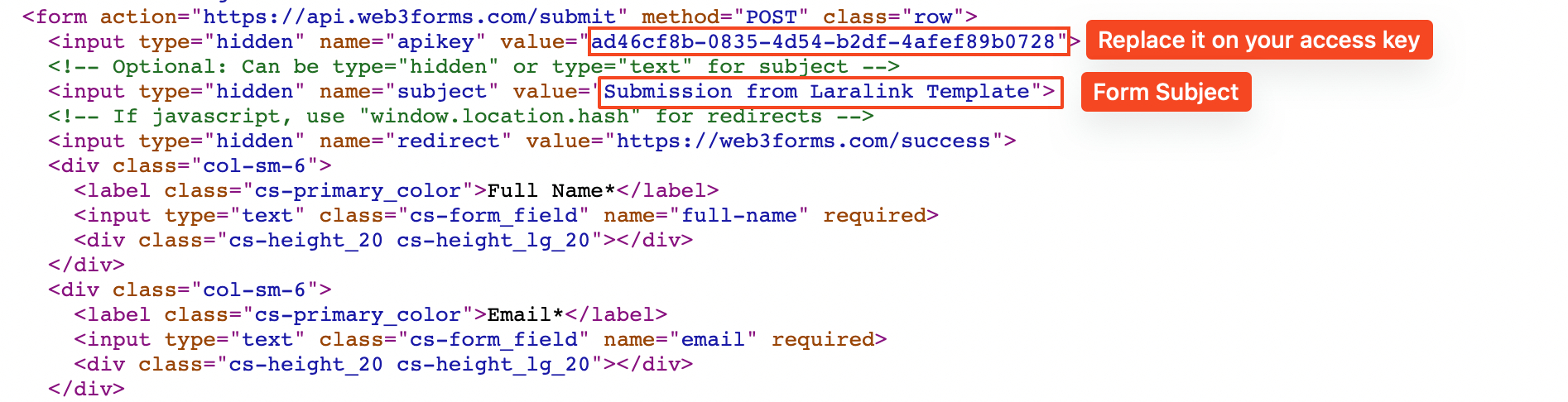
For this go to
https://web3forms.com click on "Create your Access Key" button.
Provide an email address and submit it, you will receive an email
with your ACCESS KEY copy that ACCESS KEY and replace it like the
below screen short. You can change the subject of that form like
screen short.
Sources and credits
Image Credits:
jQuery Plugins:
Rate This Template
If you like this template, please remember to rate it on ThemeForest - it really helps us to know what people think of our templates. To rate this item, go to your Downloads page on ThemeForest and give it the five star rating :

We would love to hear your feedback. If you find any bugs or have suggestions for improvements please get in touch. Nearly all of the time we follow your advice and issue a rapid update.