Briza Document
Briza _ Creative & Digital Agency Figma Template
Created: November 21, 2024
By: qubohub
Email: qubohub.help@gmail.com
Thank you for purchasing our theme. If you have any questions that are beyond the scope of this help file, please feel free to email via my user page contact form here. Thanks so much!
Introducing "Briza" Creative & Digital Agency Figma Template
Briza is a modern and versatile Figma template designed for Creative and Digital Agencies. This template includes 03+ high-quality pages such as service pages, portfolio pages, team profiles, testimonials, blog layouts, and more. Perfect for creative professionals, Briza offers a seamless solution for building stunning websites tailored to any agency’s needs. Crafted on the Bootstrap 5 grid system, this template is easy to customize and packed with essential features. Whether for business, personal projects, or showcasing creativity, Briza ensures a professional and visually appealing online presence.
Template Features
- 03 Home Page Layouts
- 17 Unique Pages
- Easy to Customizable
- Based on 1296px Grid System
- Fully Customizable
- Well Organized Layers
- All layer has been named and grouped properly
- Free font and icons
- Creative and unique design
Figma Files
In archive you will find Figma files for 17 Artboards.
- Home 1
- Home 2
- Home 3
- About
- Service
- Service Details
- Portfolio
- Portfolio Details
- Our Team
- Team Details
- Our Pricing
- Faqs
- Blog V1
- Blog V2
- Blog Details
- 404
- Contact Us
How To Edit Figma File
To edit the template, you need to open the downloaded file ("Briza.fig") with Figma. To import files with Figma, please click on the link below. Also you need on your system, and the fonts mentioned in the credits installed.Import files into Figma
As you can see on the bottom, the layers are well organized and groped into folders, which make editing very easy. So, all you have to do is select the layer from the bottom, and then edit it with Figma.

As you can see in the image below, there are multiple pages in the left area. Here you can see all the related pages.
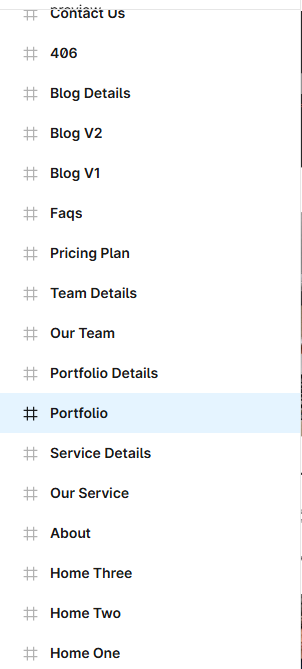
That's all! Enjoy.
Sources and Credits
To create that layout I used fonts:
Icons used in the template:
Images & Illustration Used
Support: If you need any help using the file or need special customizing please feel free to contact
me via my Themeforest profile. If you have a moment, please rate this item, I’ll appreciate it very
much!….Thank you.
I am always happy to help you. Please, contact me from my profile page.
qubohub